How do you automatically cut rallies from a badminton video?
In Spherely on iPhone or Android, select Badminton and open automatic editing. Import your match video, use the badminton AI editing option, then preview the suggested rallies and choose which ones to export.
Record one court with enough room above the players
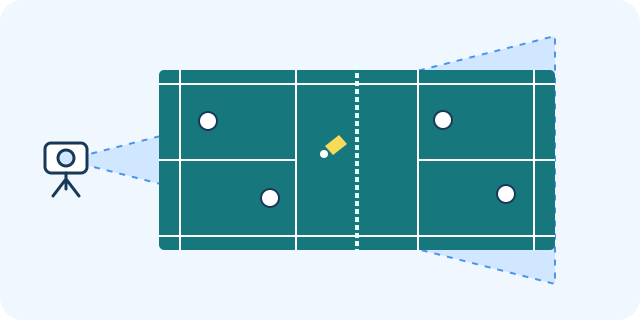
Secure your phone behind the back boundary and start with a slightly raised, wide view. Keep the net, all relevant players, and the back corners visible. For doubles, play back a test to check that all four players stay in frame.
Start behind the back boundary. Keep both sides of the net and the four players in frame for doubles.
Leave space for lifts and clears. A tight crop can lose the shuttle or an overhead swing near the top of the frame.
Frame the court you want to review. Avoid centring a second active court in the same shot, and check whether people walking behind you obscure the view.
Record the whole exchange. Keep the serve, rallies, and the end of each point together in the original recording.
Import the match and use badminton AI editing
Choose Badminton before you import the recording. Follow the app’s prompts for the available AI editing mode and check any processing or usage information shown before starting.
Select the match video. Start with a short continuous recording that contains several complete points.
Preview the suggested rallies. Review the service and the last shot of each clip you care about.
Choose what to export. Keep a longer exchange for review or select a few points to share. Check the available trim and export options in your app version.
Check what the AI included and missed
If a rally is missing or clipped early, compare it with the same moment in the original. Check for an obstructed serve, a player leaving the frame, or a camera move during the point. You can start with the points you need for your next practice.
Use a separate angle for stroke feedback
For a clear, drop shot, or smash, film one player from the side or diagonally. Keep their feet, body, and full racket swing in view. Use the corresponding AI Coach workflow for that clip.
Choose your download
Use the App Store for iPhone or the Android page to choose Google Play or an APK for your region. The download hub lists all device options. Check the current app for feature availability and usage limits.
Organize badminton practice and match videos in the Spherely app: find playing clips automatically, and review technique feedback and practice suggestions. Features vary by sport and app version.