Tennis stroke analysis: see one technical point, then practise it
Film a clear tennis stroke and review technique feedback and practice cues in the Spherely app. See how this differs from automatic rally editing, plus filming notes and limits.
TENNIS TECHNIQUE GUIDE
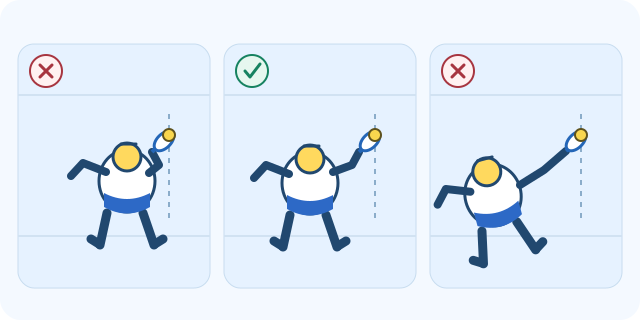
For a comfortable forehand, make room between your body and the ball and aim to meet it slightly in front on your racket side. Move toward the general area early, then use small steps to adjust. A crowded elbow or a leaning reach is a clue to check your spacing on video.
Spherely editorial team · Reviewed
The diagram holds the incoming ball in the same place and moves the player. For a right-hander, start by looking for contact a little forward and to the right of the body. Mirror the example for a left-hander.
Ask a partner for gentle feeds into the same area. Keep the pace comfortable and use the same target for both sets.
Set your phone on a stable mount so your feet, hips, racket, and the ball stay in frame. Use the side view to see how far forward contact happens. Use a rear diagonal view if you need a clearer look at the space beside you.
Watch the footage from the bounce to contact. Check when you start moving and turning, then pause at contact and compare the ball’s position with your hips. Earlier preparation can give you more time for the small adjustments.
Use the App Store for iPhone or the Android page to choose Google Play or an APK for your region. The download hub lists all device options. Check the current app for feature availability and usage limits.
Save a short video of similar forehands. In Spherely AI Coach you can review your movement and choose one cue to practise before filming another set.
COMMON QUESTIONS
Use a distance that gives your racket room to swing through contact while you stay balanced. Grip, stance, ball height, and the incoming ball all affect the spacing.
Arm shape varies with the player and the shot. Look for a comfortable swing and repeated contact in front on your racket side.
Film one player and one stroke with the feet, torso and racket visible through contact. Follow the recording instructions for the feature you use.
The diagrams and practice checklist apply the LTA and USTA cues on forehand contact, balance and adjustment steps. Checked

Bring a clear forehand clip into AI Coach and use the feedback to choose your next practice cue.
Available for iPhone and Android